Harvest quality control by bin and picker
Sample weight, defects and photos for each bin and picker.
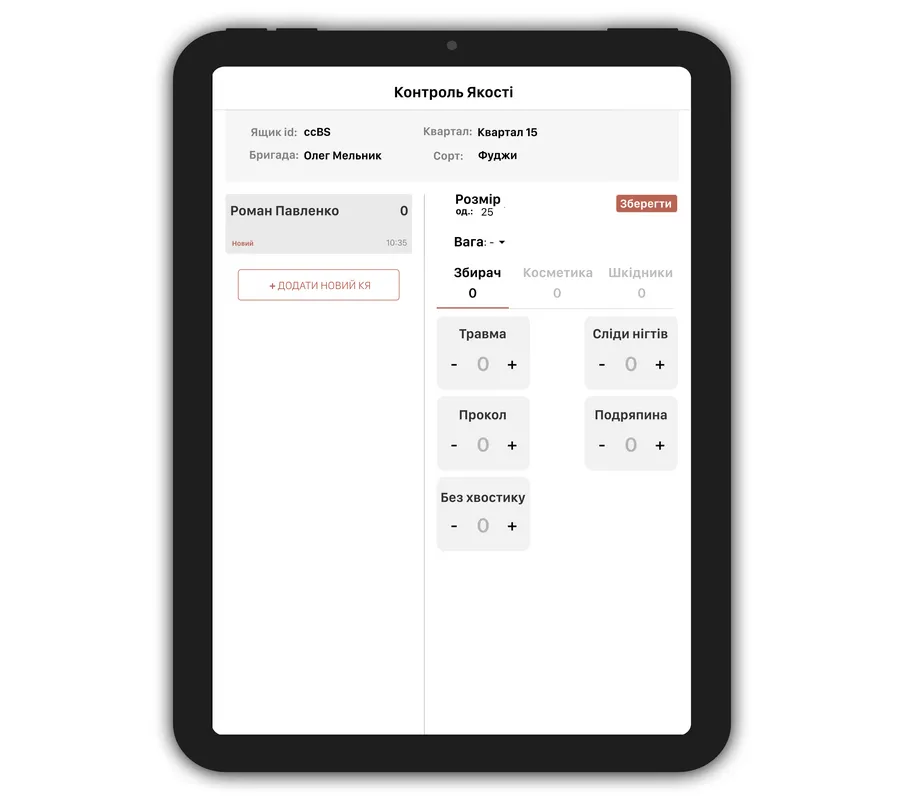
Quality control during harvest
The crew leader marks each bin's quality in the field.
Defects are counted with a tap.
See how many kilograms each picker delivered in each grade.
What a quality check records
| Data | What it holds |
|---|---|
| Bin and inspector | The check is tied to the bin, so you see who picked it and who checked it. |
| Sample | Sample size and weight, and the time of the check. |
| Defects | A count of each defect from your list: picking damage, cosmetic defects, pests. |
| Photos | Photos of rejects from the phone, right in the check. |
| Quality grade | Your grades, for example fresh, processing, juice. The harvest report counts each picker's kilograms in each grade. |
| Work quality | Separate checks of rows and tasks, scored up to 40. The score can add a bonus or reduce pay. |
Questions about quality control
Can I set my own defects?
Yes. You set your own defect list and the group of each: picking damage, cosmetic defect or pests.
Can I add photos of rejects?
Yes. Photos of rejects are added right during the bin check.
How do I see who has more rejects?
The harvest report shows each picker's kilograms by quality grade. Work quality has its own report by worker and row.
Does quality affect pay?
It can. For the work types you choose, you turn on a quality bonus or pay reduction and set its limits.
Can I export the quality report?
Yes. The work quality report exports to Excel or CSV.
Will these records help at the audit?
Yes. Quality records stay with the bin and are ready for a GLOBALG.A.P. audit.
Start with one crew
Start with one or two crews, even mid-season. We move your data and set the system up for your crops.